Inform a small documentation project with data
This is post 5 of 5 in the Data-informed documentation series. Start at the beginning: Practicing data-informed documentation.
When you take on a small documentation project, you can inform each step with data. It might seem like overkill. Small projects are often ones that you tend to consciously plan or build a process around — they’re mostly an execution task:
- An interrupt from a colleague that you pick up while on triage, letting you know that they changed the title of a chart in a dashboard.
- A tag from someone on a Slack thread where a customer is confused about when a specific type of query is run.
- A page quality feedback comment asking how often the data in a dashboard is updated.
It’s easy to treat each small documentation request as an important task to deliver, especially with AI-driven workflows. Avoid bloating the content, and thus the context that your reader must absorb, by using data to inform even small documentation requests and determine whether to write something at all.
When you work on a project this small, the phases look somewhat different from those of a medium or large-sized project:
You also want to keep the time that you spend on each phase in scale with the size of the project itself. For a small documentation project, spend the most time planning the update, less time making the update, and even less time on evaluating the outcomes of your update.
Plan small documentation updates #
When planning a small documentation update, examine the request and determine whether a documentation update is the right approach. The request is the first, and most important, data source. As part of planning the project, you want to identify the actual problem leading people to request the documentation be updated. Based on that, you can then evaluate if a documentation update is the right approach.
Choose how much data, and which sources to use when planning your small documentation updates depending on your analytics capacity :
| Capacity | Key data sources |
|---|---|
| None or Basic |
Original request Product exploration |
| Growing or Defined |
Page quality feedback Product exploration, Documentation exploration |
| Mature | A wide variety of customer submissions and research |
Evaluate the request #
When evaluating the request, take a data-informed approach and use the following resources to identify the root cause and qualify the request:
Customer submissions
Support cases
Community forum questions
AI chatbot conversations
MCP server interactions
Social media posts
Search terms
Slack posts
GitHub issues and PRs
Research
Documentation exploration
No matter what data sources you use to contextualize the documentation request, consider the following:
- What is the request?
- How often is the request being made?
- Who is making the request, both how many users and of which type?
These are essentially triage questions, and the answers can reveal that something is inaccurate, needs clarification, or can lead to data loss or a security issue for customers.
For example, given the following documentation requests that you might receive:
- An anonymous comment requesting details about how often the data in a dashboard is updated, so you might want to add a note about latency to the documentation.
- A support case requesting guidance for scheduling a data export from the dashboard to run automatically, so you might want to add a task or example to the documentation.
- An internal solutions engineer asks for details in Slack about how the data in a specific dashboard column is calculated, so you might want to add a reference table to the documentation.
With just the data in the request alone, it might seem like only one person is asking this infrequently. If you attempted to situate the requests on the following chart, they might all be an “A”:
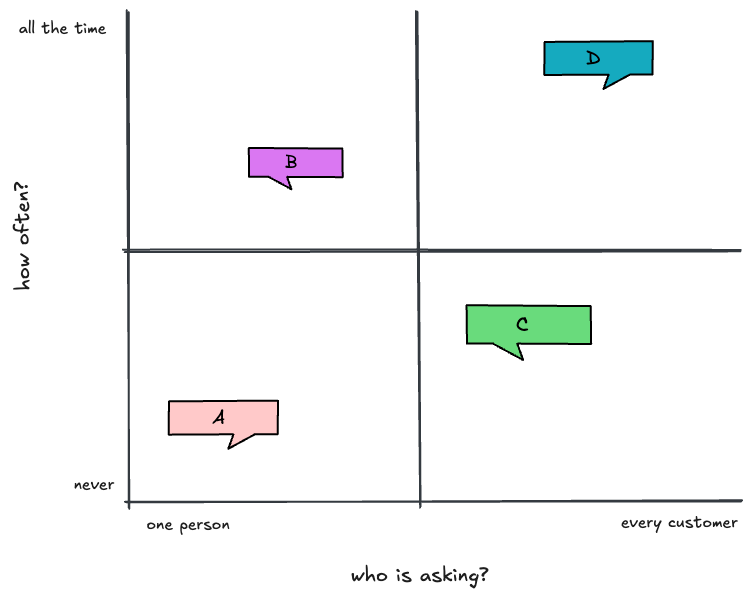
But what is actually true? For each of these requests, even the straightforward accuracy, clarification, and risky ones, you can provide better outcomes for your readers by adding data to inform your planning process.
You don’t need to use every data source available to you, especially if you have limited analytics capacity, but you want to look at a few different types to qualify the request and be able to answer the earlier questions with a reasonable degree of certainty.
For example, consider customer submissions :
| Data source | Questions |
|---|---|
| Page quality feedback | Have customers submitted feedback about this topic before? Is there an existing ticket for this request? |
| Support cases/chats | How many customers are contacting support about this issue? Who are they? |
| Community forum questions | Are customers asking questions about this issue? |
| AI chatbot conversations | Are customers asking the AI chatbot on the docs for help with this? |
| MCP server interactions | Are customers asking their AI assistants for information about this? |
| Social media | Are customers posting on Reddit, LinkedIn, or elsewhere about this? |
| Search terms | Are there unsuccessful searches on the docs site for this information? |
| GitHub issues and PRs | Are there existing issues open about this request? Has anyone opened a PR attempting to update the documentation? |
From the volume of requests alone, you might recognize that lots of different customers are asking for this information pretty frequently — in which case, this is either an urgent small documentation task or a larger task that needs a medium-sized approach.
The data that you collect about a request might move it from an “A” to more of a “C” or a “D”, in which case delivering documentation becomes more relevant.
For example, take the request to add information about how frequently the data in a dashboard is updated. When you go to investigate how common of a question that is, you might see a wide variety of other questions about the same dashboard. For example:
- How is the data in the dashboard calculated?
- Can I access the raw data behind the dashboard?
- How can I export and save the data on a schedule?
You can then decide what to do next — expand the scope of your project or not. You can choose to identify, record, and address all three of these requests at the same time — effectively promoting the task to a medium-sized project. Or, you can note the larger (scope creep) tasks for later and address only the small-scoped item to add the data refresh details for now.
If you continue with the small task, add research to further qualify the request and plan your writing task :
Qualify the customer #
When analyzing customer submissions , you’re trying to identify roughly how many customers are affected or share the request, and what they might have in common. This qualifying step helps you determine if the request is a universal concern (and thus a good idea to document), or something specific to a customer’s configuration (and thus likely irrelevant to add to documentation).
For example, in response to page quality feedback requesting details about how often the data in a dashboard is updated, you might perform research to answer the following questions about the customer experience:
- Who reported the issue? Was it an internal or external customer? If an internal customer, are they acting on behalf of an external customer?
- Is the issue, or confusion about the issue, reflected in (additional) page quality feedback, support cases, or questions posted to the product forum or community sites?
- Are people searching terms like “latency”, “delay”, or “not as expected” for this dashboard?
Explore the product and its code #
Further qualify the context of the request by answering the following questions about the product with product research .
For example, in response to a request for details about how often the data in a dashboard is updated, identify what the latency is and why it exists:
- Test the product and attempt to replicate the latency.
- Review the dashboard and examine if it provides any details directly, in descriptions or tooltips
- Determine if the latency is intentional, and associated with a scheduled process with a fixed refresh rate that you can easily document
- Identify whether the refresh rate is supposed to be immediate. Perhaps there is a known limitation of the product that might get fixed, but not anytime soon, causing it to be intermittently longer.
- Establish if the latency is actually a fluke due to one customer’s system configuration, and not something happening to other customers.
How easily you can answer these questions reflects the scope of the task and the analytics capacity of your organization. If the answers are easy to find, the task stays small and your analytics capacity might be growing or more mature than that. If the answers are undocumented internally, not available in code that you or AI tools can access, or otherwise difficult to find, the project can start to creep in scope due to unavailable data and context. Avoiding that scope creep is why it matters to identify your analytics capacity before deciding when and whether to add data to a project.
Refer to existing documentation #
You can also explore the documentation itself to help plan your approach and qualify the request .
Review the existing documentation. For the example of investigating dashboard latency, review the following:
- Check whether the information is already documented, but perhaps hard to find. Is there a page for all dashboards that mentions latency, but it isn’t linked from individual dashboard pages consistently?
- Determine if there is a standard template used across all dashboards that wasn’t used for this one, intentionally or otherwise. Do other dashboard docs mention latency numbers? Is there a standard for how to document a data refresh rate?
AGENTS.MD, CLAUDE.MD) to review similar documentation pages for necessary changes when making documentation changes to one page.
With the research complete, finish your data-informed plan.
Plan what changes to make and why #
After performing research to evaluate and qualify the request, you can plan what changes to make to the documentation, and justify why:
| What you found in the data | Action to take |
|---|---|
| Latency of up to 4 hours is expected. | Add a note to the dashboard documentation. |
| Misconfigured settings can cause a refresh delay. | Add a note to the dashboard documentation. |
| A bug in the data pipeline causes latency for some customers. | Add a known issue to the product release notes. |
| One customer misconfigured a setting and thought there was latency. | Do nothing in the documentation. |
| Latency was documented but on a main page about all dashboards, not a specific dashboard page. | Add the latency, or a link to the main page, to each dashboard page. |
If you determine that writing a small documentation update is the right path, continue with that part of the process, otherwise skip to evaluating your decision.
Write small documentation updates #
In planning, you identified whether there is truly a documentation issue. Now, you execute and deliver on your data-informed plan:
-
Keep it small and write a documentation update. For example, in the case of the dashboard latency, your data-informed plan indicates that this is a commonly asked question shared by numerous customers, so you add a note to the dashboard documentation.
Embrace the expanded role of a tech writer as a proactive product advocate. Even when adding a small documentation update, consider meeting with the team that maintains the dashboard to identify if there is an in-product option to make the latency more apparent on the dashboard itself, such as by adding a “last updated” timestamp in the page footer.Tech writer as proactive product advocate -
Recognize scope creep and pivot to a medium-sized project. Your data-informed planning might have revealed that the seemingly small request is actually a medium-sized project if you act on it properly.
For example, a request to clarify how the data in the dashboard is calculated involves updating the existing dashboard templates for your documentation site to include a data dictionary with a column detailing how calculations are derived. That involves multiple teams to gather the necessary data, and a few weeks (instead of a couple of hours) to make the changes that are most helpful to the customer.
Without using data to inform your plan for handling this request, you might have added information about how the data for a specific column was calculated for one dashboard, and not considered improving the other dashboards (because that wasn’t requested).
-
Split the request to keep scope small. As another example, for a request to export and save the data on a schedule, your data-informed plan reveals that this is a frequent question asked by a particular cohort of users. Unfortunately, you have limited time to deliver the request. As a result, you take a twofold approach:
- Add a short task with steps for how to export and save the data on a schedule
- File a ticket to recommend adding a worked, end-to-end example of exporting and saving a specific slice of the data on a weekly schedule.
If you use AI in your drafting process, it can be easier to add data into your workflow, but the size of a small documentation change can limit the utility of adding data in this phase. Some practical examples of using data with AI agents is to use your knowledge of the existing code base to prompt an agent to copy the structure of a note on another page, or to create a reusable snippet with some existing note text, and add that to a documentation page. You can rely on your documentation research to take AI-enhanced shortcuts.
Guard against context bloat #
A risk of using AI in your writing process , even in a data-informed practice, is that it is easier to respond to every request by automatically delivering on it. Request received in a Slack thread? Summon an agent immediately to make the requested update!
That sort of responsiveness can seem like ideal customer service, but it can also lead to bloated content that contains irrelevant information.
Knowing that AI agents are increasingly consuming your content might motivate you to add more content than you might otherwise, so that the agents have all the context available to them. However, if you continually make small updates to your documentation, adding new bits of information when requested, the key points of the content can get lost.
As Dachary Carey has discovered with her research, such as in Agent Web Fetch Spelunking, agents can miss content buried in large pages, and they have limited context windows.
If you have too much content, you risk context bloat and distracting your human and AI-powered content consumers. Instead, take the time to plan and use data to inform even small documentation changes. Contribute your expertise as a user advocate, curating the documentation experience.
Evaluate small documentation updates #
When evaluating a small documentation update, your main goal is to assess whether you sufficiently addressed the original request. The data you use to inform the project helps you reduce uncertainty about your direction, implementation, and validate the outcomes.
Small changes to the documentation often aren’t noticed by customers, so aggregate quantitative metrics don’t show any measurable difference. As a result, how you evaluate the change looks different from a medium-sized or large project.
Based on your uncertainty about the change, the scope of the change, and the amount of data in support of the change, choose different levels of effort when evaluating the change:
- Skip the evaluation stage entirely! If you don’t have any uncertainty about your decision (and neither does your leadership team), you can skip evaluating the change. This is especially true if you have a basic or growing analytics capacity. Trust your expertise and move on to the next priority.
- Follow up with the original requestor. Talk to them and validate whether the issue is addressed, and whether they’ve received or have any additional relevant feedback. This approach has the advantage of letting you acknowledge the feedback and communicate the actions you took, hopefully turning the requester into an ongoing source of documentation feedback.
- Check in on qualitative data in two months. A direct conversation with the requestor isn’t always possible. For example, the request might be many months old, and you’ve just now had time to deliver on it, or if the request came in anonymously through page quality feedback. In those cases, make a calendar reminder for two months after the change was published to see if there were any measurable changes in qualitative data sources, such as support cases or AI chatbot conversations .
- Assess a full before and after data baseline. If you have a mature analytics capacity , or if you might replicate a small change on a larger scale if they prove useful (such as a full overhaul of in-product dashboard documentation), draw comparisons across many data sources after the change with a time period before the change. Compare the two months after the change with either the two months before the change, or use the same time period of the previous year to account for seasonality.
With this more elaborate approach, you might want to review the following data sources :
| Data source | What to look for |
|---|---|
| Page quality feedback | Do you still get feedback comments about the confusion that led folks to write in? |
| Support cases | Do you still get cases asking about this thing that you clarified? |
| AI chatbot conversations | Does the chatbot answer the questions more clearly and correctly? |
| Search terms | Do search terms about the issue find results, or have a higher % of clicks on the page that you updated? Search volume might be the same (or higher), but the journeys to get to the relevant information (the page you updated) are hopefully shorter. |
| Page views and click activity | If you updated only the release notes, you can review the number of page views and click interactions with the note that you added. |
| Product telemetry | If you updated only the product, look at usage of the page that you updated. |
If you use quantitative sources, remember that the purely quantitative sources of data only reveal impressions, not understanding or direct interaction. They help you assess whether the change reached your users, but not whether they actually read it.
Evaluate a choice to not write documentation #
If you decide not to make a documentation update based on the data you consulted in the planning stage and instead decide to make an update to the product experience, you can evaluate that choice too!
For example, you added an on-page description and some tooltips for more confusing terms for a dashboard in the product, rather than adding a note to the documentation about the dashboard.
How do you know if those changes were effective on their own and don’t need to be partnered with additional documentation updates? Review additional data sources from customers :
- Search terms and MCP server interactions to evaluate if people (with or without AI agent assistance) are still looking for information about this dashboard and not finding it.
- Support case details and chat transcripts to identify if people are contacting your support team with questions about this dashboard, even after the change was made.
- Questions in Slack, GitHub issues, or the community forum to identify if there are more or fewer questions about this issue.
In addition to changes in feedback patterns, the amount of feedback that you see from customers is also relevant. If you only see a few requests, or a few pieces of feedback about this issue over a quarter, the data isn’t large enough to treat as a representative sample.
An absence of data can be a good sign, but only in comparison to a relevant baseline. For example, if there was a strong pattern of consistent support cases for this dashboard, or search queries for the confusing term, and after the change you make there are no longer support cases or search queries for the term, that drop-off is a likely indication of success.
On the other hand, if customer submission data sources remain the same after the change, it’s possible that your change wasn’t effective. An even clearer signal is if requests to update the documentation remain consistent, or resume. In that case, return to your planning data sources, collecting and analyzing more to identify whether to actually update the documentation.
Practice data-informed documentation on a small project #
Taking the time to inform even small documentation projects with data strategically ensures that your content remains relevant and useful for your readers. Not all requests need to result in documentation updates, and not all seemingly small requests stay small.
By taking a data-informed approach, you can effectively deliver relevant, curated content updates without unexpected scope creep or bloated pages that confuse human readers and AI agents they might use.