Inform a large documentation project with data
This is post 3 of 5 in the Data-informed documentation series. Start at the beginning: Practicing data-informed documentation.
If you’re about to start a large documentation project, you can inform each step of the process with data. Why? So that you can be more confident in the decisions that you make, and to base those decisions in what customers are actually doing and asking about.
In the context of this post, a large documentation project is something like reorganizing a large set of existing documentation, or writing a large set of documentation from scratch to support a new feature.
- Maybe a longstanding bit of functionality is being deprecated and replaced with another set of functionality
- Maybe a new feature launch means that you need to reorganize and reframe an existing set of content.
- Maybe a large change to the user interface is launching, requiring some new documentation and a lot of updates to existing content.
No matter the specifics, a large documentation project is one that will take you a few weeks or months to complete. A large part of that time is likely to be spent in planning — identifying the scope, direction, and desired output of the project.
In this post, I’ll cover how to use data to inform each phase of the project:
- Plan the scope of the changes and what changes to make.
- Write all the necessary changes.
- Evaluate the effect of your changes.
Plan your large documentation project #
When you plan a large documentation project, you primarily want to identify the scope and the direction of the project itself, answering questions like:
- What documentation pages are affected?
- What changes need to be made?
- How much work will the changes require?
Answering these questions can be easier when you add data.
Expertise
Documentation understanding
Research
Competitive analysis
System
Documentation metadata
Customer submissions
Website analytics
Community forum questions
MCP server interactions
AI chatbot conversations
GitHub issues and PRs
Even if your organization has a relatively basic or growing analytics capacity, planning a large documentation project can be a good place to start practicing data-informed documentation if you have the time and support. While your organization might have some gaps in existing data sources or expertise, you can start to build capacity with targeted data gathering through a content audit or documentation metadata collection.
Consider what you already know #
A perhaps under-considered data source when planning a documentation project is It might be nontraditional to consider subjective information (your own personal expertise) as a type of data (it has been pre-processed and transformed into knowledge, so it isn’t data in its raw form!), but your personal expertise is essential context, and a crucial component of any documentation planning exercise. .
Each documentation project exists because something in the organization created a need for it.
Your personal context and understanding of the organization is essential to help plan and scope the documentation project itself. Depending on your tenure at an organization, you might apply this context subconsciously, but consider making it an active, intentional part of your planning process.
Especially if you use AI agents to plan your work, an agent does not have access to your own expertise unless you provide it as part of the context.
The data source of your understanding of the business is also possible to access for anyone, no matter their analytics capacity. Recognize your place in the organization and review what you know.
Take an example project where new functionality is being released, and you need to reorganize and reframe a large, existing set of content. Your knowledge about the organization can contribute to planning a large documentation project by answering the following questions:
- How will the new functionality be positioned in the market?
- Does the new functionality target a different buyer than the existing product functionality? If yes, who are they?
- Is the new functionality a central part of product market positioning, or is something else the focus?
- What company strategic initiatives does the new functionality support?
You might end up doing some research , or building some partnerships with folks in marketing, to more fully collect answers to these questions.
Why are these questions relevant to consider when planning a large documentation project? The answers can help you address scoping questions like:
- Does the documentation architecture need to be updated to reflect changes to product positioning in the market?
- What use cases might you want to address directly with examples?
- Will specific kinds of decision support or conceptual overviews help support sales enablement or product marketing collateral?
In addition to compiling data from your knowledge about the company and product positioning, perform some focused research.
Perform research #
Research is another form of data collection and analysis . Identifying what you need to know in order to effectively plan the shape of your content involves research into product capabilities and context about the way the product development process functions.
For a large project especially, it’s valuable to review what industry leaders and competitors document for similar large projects.
Do product research #
To effectively plan documentation about a product, you need to know about the product. As part of the research you perform , gather data about the product development pace, patterns, and plans:
- Is this functionality going to stay the same for several years, or will it change again in a few weeks or months?
- How much development is going on in this feature area, now and in the future?
- What future projects are planned in this feature area?
- Is this a generally available release, or an alpha, beta, or preview release?
As part of your job you might have enough relevant product expertise to start planning the project already, but you might also need to do dedicated research to collect relevant data.
Do focused research to answer product-specific questions like the following:
- Is this feature or functionality similar to existing functionality in the product? If so, how is it similar? How is it different?
- How discoverable is this functionality in the UI? Does it have a top-level menu or is it buried several layers deep in a menu, behind an unlabeled icon, or something else?
- How many changes are being made to the user interface?
- Are there new permissions requirements being added as part of this project?
- How confusing is the UI to use? Will it stay that way?
Overall, to help you plan you want to know: What is changing? How much is it changing?
As part of your research, use the product yourself! If possible, access a development or staging version of the product functionality and use it as a user might to perform specific tasks.
If, due to the type of product that you’re developing (or other reasons), you can’t directly access the product to explore it yourself, you can still use other research methods to answer these questions:
- Interview the developers and designers that contributed to the product changes.
- Review pull request descriptions, screenshots, and work-tracking tickets from a system like Jira or Linear.
- Read the code, possibly with assistance from an AI agent prompted to gather data, to help answer relevant questions like required permissions, scope of the changes to the user interface, and more.
You can then use the data that you collect to scope the large documentation project. For example, given a large scale deprecation, a new feature launch, or a redesign of the user interface, consider the following:
- Does I need to add new standalone pages for the new feature launch, or will I mostly be updating existing pages?
- How many existing pages might I need to update?
- Do I need to add a conceptual overview about the redesigned user interface?
- If the new feature is similar to an existing feature, do I need to add decision support guiding users about when to use one or the other?
- Especially if the user experience is confusing or the new functionality is hard to find, how much detailed content is relevant for me to add?
- How many screenshots do I want to add to support the redesigned user interface?
- Is a tutorial relevant and useful for users, or would an end-to-end example be more clear?
For example, if you are documenting new functionality that is incredibly complex and buried several layers deep in a menu when you test it out, you can give feedback to the product engineering team that they might want to update it, but you might also plan your documentation deliverables differently, perhaps planning to add more screenshots to your task steps or more detailed wayfinding guidance in introductory pages.
Perform competitive analysis #
For some large documentation projects, it can be useful to perform a competitive analysis or review of competitor documentation and websites. Gather data from the broader industry and how your documentation exists in that context :
- What are your competitors doing with their documentation?
- What content structures are in use elsewhere?
- What terms are commonly in use to describe different features or functionality?
- What types of content exist for this type of feature in similar products?
For example, given a large scale deprecation, or a redesign of the user interface, you might review the content of industry leaders for best practices to use as models for your own content:
- What content types support a large scale deprecation or redesign?
- How do other organizations communicate deprecation timelines?
- What do you like or not like about the choices others are making in communicating the changes?
For a large documentation project supporting a new feature launch or a new product line, you might review competitors with similar features or products:
- What content types exist?
- What sections exist and how are they organized?
- What terms do those organizations use to name the feature or product capabilities?
- What use cases and examples are referenced as supporting content?
- What do you like or not like about the architectural decisions?
- How do the architecture choices align with (or not) the current state of your organization’s documentation?
You can use the competitive review and analysis to plan the shape of the work that you want to produce for your own large-scale documentation project:
- What does the ideal end state of this content look like?
- Is aligning terminology going to be part of the project?
- What content types need to be included for this type of documentation?
Documentation-specific data #
Data about your organization’s existing documentation is crucial to inform scoping questions for the planning process.
Documentation-specific data is the broadest category of data, and also accessible in different ways to organizations with different analytics capacities . If you have a lower analytics capacity, you might only be able to perform basic tasks from this section, possibly a content audit or some small-scale tooling assessments. If you have a defined or mature analytics capacity, you can likely take advantage of most of the guidance in this section.
To help you plan your large-scale project, take advantage of the following documentation-specific data sources:
- Assess the current state of your documentation team, processes, and tooling.
- Collect data about the current state of your documentation with a content audit.
- Review metrics and metadata to inform and prioritize the changes in your plan.
Assess your documentation understanding #
To help plan what resources are available to you as part of the large project, collect answers to the following questions about your documentation team:
- How many people are working on related projects?
- Who might have additional bandwidth available?
- Who has different helpful skills that might help make the project more successful, like a background in instructional design, visual design, or video production?
- Is translation or localization of content a consideration?
To help plan what content shapes, structures, and tactics are available for your large documentation project, collect answers to the following questions about your tooling:
- Is content reuse supported?
- Are there platform limitations for different types of information hierarchies?
- Can you programmatically update screenshots or text across multiple pages of content at once?
- Can you use AI tooling with the content management system?
- Do you use version control systems to track changes over time?
The answers to those questions can help you plan the project:
- Identify the need for a release branch strategy in git to streamline collaboration of multiple writers on related content.
- Determine the amount of work necessary to complete and whether additional writers or other collaborators are necessary to finish the project during the available time.
- Recognize tasks that might take more or less time depending on the limitations of the content management system.
- Identify limitations in tooling that you need to plan around in advance, such as navigation structure limitations.
- Plan where to draft the long-lived content for the large-scale project.
- Account for expected time to complete translations to make localized content available.
With an understanding of the current state of your documentation site, tooling, and content, you can plan the scope of the project more accurately, considering issues like:
- What content structures and designs are possible? How can I structure the end result?
- Will this project affect the translated docs?
- If yes, do I need to finish my documentation sooner so that it can be translated in time for the release?
- Where do I place the content in the table of contents for the site?
- How many other writers or teams do I need to coordinate this project with?
Perform a content audit #
A content audit is essentially a targeted data collection exercise, reviewing the current state of the documentation . Often, a content audit is performed as a quality evaluation of an entire set of content. However, for a content audit to support planning a large documentation project, you can scope it to just the relevant sections of the site.
For example, if you are planning documentation to support a product deprecation, you need to perform a content audit of all the pages that mention that product (which is hopefully not every page in your company’s documentation).
A content audit is important data collection. With a good understanding of the current state of the relevant parts of your documentation, you can more accurately plan the scope of the changes you need to make as part of your project.
As part of the audit, answer questions like the following for each page:
- How accurate is the content?
- How complex is the page structure?
- Who is the audience?
- What is the goal or learning objective of the content?
- Is the content up to current style guidelines?
Depending on how much time you have available to perform an audit, you can provide in-depth answers or perform surface-level evaluations.
For the example of a deprecated feature, a content audit might help you recognize the following about the affected documentation pages:
- Most pages are accurate, but some are inaccurate and will need additional updates as part of the deprecation work.
- Some pages are structured with a lot of complex tasks, so those pages will need to be restructured and rewritten to make it easier to communicate the deprecation, for example by separating the tasks specific to the deprecated functionality to a dedicated section, instead of being integrated with the page sections.
The content audit produces data you can use to consider the scope and shape of the plan for your large documentation project.
Review documentation metadata #
Documentation metadata can help you scope the project as well. You can gather and analyze documentation metadata like the following :
| Metadata | Example value | Source | Level |
|---|---|---|---|
| Page count | 812 |
Content management system | Site |
| Section title | Administer |
CMS | Page |
| Last updated date | 2026-08-23T16:04:34Z |
Version control or CMS | Page |
| Header count | 8 |
Computed | Page |
| Header depth | 3 |
Computed | Page, per header |
| Link count | 4 |
Computed | Page |
| Unique link count | 3 |
Computed | Page |
| Image count | 1 |
Computed | Page |
| Image has alt text | True |
Computed | Page, per image |
| Word count | 1273 |
Computed | Page |
| Code sample count | 4 |
Computed | Page |
| Code language | Python |
Computed | Page, per code sample |
| Code test results | Pass |
Test suite | Page, per code sample |
You can gather this data through a manual content audit, through an API, or compute it yourself based on the contents of your documentation pages with a script. Some metadata might be available in the files containing your content, such as in page frontmatter. Other metadata might be site-specific and configure the navigation or table of contents of your site. Other metadata might be available from a version control system, like git. Other metadata might need to be computed.
The approach you might take to collect documentation metadata depends on the tooling that you use and your analytics capacity. The more API-accessible your tooling and the greater your analytics capacity, the more likely you can perform a complex, scripted collection & analysis of this metadata. With a more basic analytics capacity, Speaking from experience… .
If you use version control, you might also have access to git commit metadata, for example the details of a pull request squash-merged to your release branch in GitHub.
Version control systems can also usually show you a line-by-line difference of when a page was last updated, making it easier to see precisely when an image was last updated, for example. Alternatively, if you host your own images, you can use the last updated date for the image file itself as a signal.
The data that you collect might be well-structured like the following, or it might be a chaotic spreadsheet. Either way, it can be useful metadata for planning a large-scale documentation project.
Example JSON-formatted documentation metadata
{
  "section": {
    "title": "string",
    "pages":
        {"pageId": {
            "title": "string",
            "url": "string",
            "last_updated": "datetime",
            "contents": {
                "body":"string",
                "word_count":"number",
                "headers": {
                    "total_count": "number",
                    "header": {
                        "depth": "number",
                        "text": "string"
                    }
                },
                "links": {
                    "total_count": "number",
                    "link": {
                        "path":"string",
                        "external":"boolean"
                    }
                },
                "code_samples": {
                    "total_count":"number",
                    "code": {
                        "sample":"string",
                        "language":"string",
                        "test_results": "boolean"
                    }
                },
                "images": {
                    "total_count": "number",
                    "image": {
                        "path":"string",
                        "alt":"string",
                        "last_updated_date":"datetime"
                    }
                }
            }
        },
        "pageId": {
            "title": "string",
            "url": "string",
            "last_updated": "datetime",
            "contents": {...}
        }
      }
   }
}
With whatever metadata you have available, you can answer at least some questions like the following:
| Question | Metadata |
|---|---|
| How many pages are there? | page_count |
| How many pages in each section? | section_title |
| When was each page last updated? | last_updated_date |
| How many headers exist? | header_count |
| What depth are the headers? | header_num |
| How many links exist? | link_count |
| To which pages do the links point? | link_count_distinct |
| How many screenshots and images exist? | image_count |
| Do the screenshots and images have alt text? | image_alt_text |
| Are the screenshots and images up-to-date? | last_updated_date |
| Are there code examples on the page? | page_code_fence_count |
| Does the code run? | code_test_results |
The answers to these questions, in combination with other, more targeted data collection like the content audit or competitive analysis results, help scope and outline the shape of your large project.
For example, given a large scale deprecation, a new feature launch, or a redesign of the user interface, consider the following to scope your project:
- How many pages have images that might need to be updated or removed entirely?
- How many pages include content about the deprecated functionality? How many include UI-based steps that will be changing?
- How many links do you need to update?
- When might you want to update existing new pages or add new pages because the current ones are too long or complex?
- How many pages will need general accuracy updates or rewrites when they’re updated for this project?
The metadata by itself doesn’t offer enough context to help scope the project, but when combined with your documentation research and product research, you can plan the shape of the large-scale project.
Examine customer data #
When planning a large scale documentation project, customer data can be a valuable source when making more tactical plans about what content to write and how to write it. To plan the specifics of what you will write, you can gather data sources like the following:
- Search terms
- Website traffic, referrer data, and other analytics
- Community forum questions
- MCP server interactions
- AI chatbot conversations
- GitHub issues and PRs
Depending on your analytics capacity, this data might be available to you in a boilerplate analytics tool like Google Analytics, a dashboard in your content management, a dedicated data analytics tool like Snowflake, Sigma, Tableau, or others. You might also not have access to any of this data.
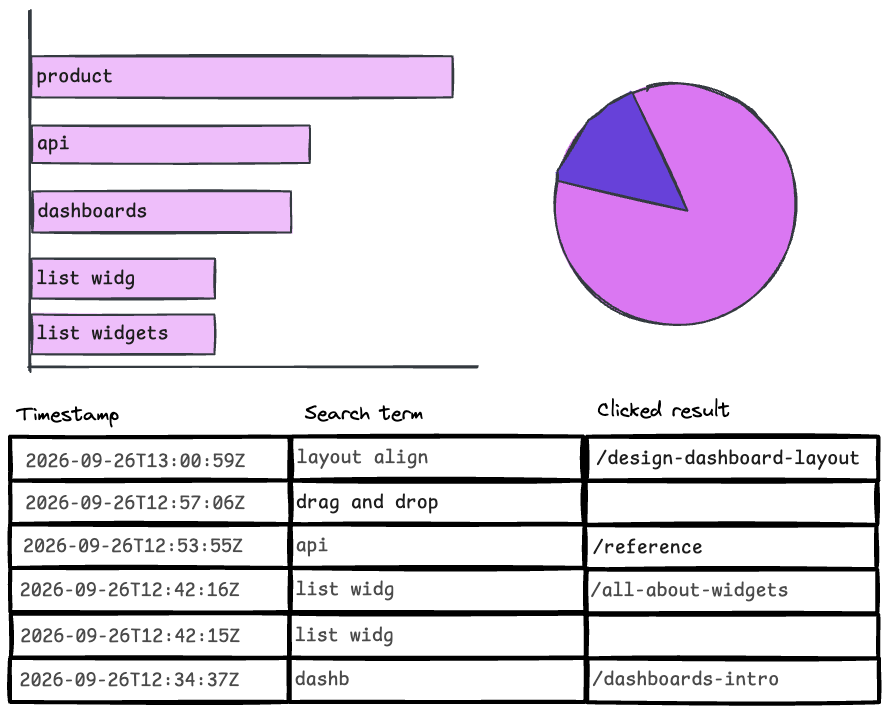
You can use the data sources available to you to answer specific questions like:
- Do the search terms used by customers match the terms used in the documentation?
- Which keywords commonly lead people to the documentation that you’re updating?
- Do people ask about this functionality when interacting on the community forum or with an AI chatbot?
- What use cases and challenges do people talk about on the community forum or with an AI chatbot in context of this functionality?
- Which websites and content types refer people to the documentation?
- How many unique viewers and views does each page have?
- Which agent-derived keywords through MCP server interactions generate traffic to the pages in your documentation that you plan to update?
The answers to those questions then inform your plan for the large-scale documentation project:
- Inform what terms to include in the topics that you plan to write, such as guiding title or header terminology choices.
- Guide which content to move or not move, based on referral traffic or organic search traffic that might make a URL slug change expensive.
- Identify pages with strong, existing information scent (popular search destinations) that might need special handling to make sure you don’t affect existing content findability.
- Prioritize specific use cases or examples to implement in the content.
Each data trail is a trace left by a user that you can use to derive vague usage patterns that you can model and shape as you redesign the content experience with your own updates and changes as part of the large documentation project.
Plan the shape of the work #
As you collect and analyze relevant data sources, you can plan the shape of the large documentation project and the end state that you are working toward.
- With the competitive analysis, you identified different content types to write and navigation structures to implement.
- As part of the content audit and documentation metadata review, and assessing the documentation-specific data you identified the scope of the pages affected, constraints and opportunities from the team and tooling, and types of changes that need to be made.
- You reviewed customer data and activity to guide content decisions.
When you know the shape of the work, you can identify what success looks like so that you can evaluate it later. For example, for a deprecation, success might be an easy reference page to send in an email about the deprecation; for a UI redesign, success might be fewer questions than expected about the UI changes in support chats. Take a moment to define a measure of success as part of your plan.
Write a large documentation project (informed by data) #
Writing is the stage where using data to inform your process is perhaps the least relevant. You’ve already made a data-informed plan — this step is about delivery. Enter that fugue state and get to writing.
For example, given a large scale deprecation, a new feature launch, or a redesign of the user interface, this is when you start making the changes:
- Surgical updates to pages that link to others to mention deprecated functionality
- Sweeping changes to task steps to change the navigation instructions
- Scaffolds of a new section of the navigation and accompanying new pages to match
- Meticulous updates to screenshots
As you start drafting and reviewing, you might discover new data that requires additional planning — some previously unidentified scope of the project, or new user requirements that involve updating additional pages and more product research. Writing and planning can be an iterative process, especially for a large project that runs over many weeks.
But keep the data that you collected as part of the planning process close at hand. There are still some opportunities to use that data to inform your writing tasks in a large documentation project.
Guide AI-driven prompts #
If you use AI tools as part of your drafting process, whether to draft content, make larger mechanical changes like link slug updates, or create new files that you then author, the data sources that you used as part of planning can be valuable context to guide AI-driven prompts.
- Use search terms as context for header, introduction, and page title drafting.
- Use existing, up-to-date pages as reference models for new file creation.
- Use curated community forum questions, AI chatbot conversations, and GitHub issues as fodder to create a troubleshooting guide.
- Include product-positioning context and audience details to output relevant code examples based on actual customer use cases.
If your data sources are available with an MCP server, it’s even easier to add relevant context to your drafting, for example with a prompt like:
Use the MCP server to look up support chats that mention an error or bug from the last 60 days and identify the related features. For issues related to the to-be-deprecated functionality, propose troubleshooting sections in order of frequency based on the findings.
Or for automating content updates related to the UI redesign:
Follow the pattern established on this reference page
/path/to/human-authored-draft.mdto update the other pages in the same section. For guidance about terminology, use the MCP server to look up the terminology list.
If you don’t use AI tools as part of drafting, but you do use AI tools as part of the content review process, you can follow a similar prompt for the deprecated functionality example:
The following pages are new and address the same use case as the to-be-deprecated functionality on these other 3 pages. Review the headers and introductory sentences for each new section for consistency with the search terms that lead users to click on the 3 preexisting pages.
Data is context for AI tools, and the output can be improved with relevant, curated context for your task.
Whenever you plan to use AI with documentation drafting, make sure that you have an established AI strategy for documentation to help ensure responsible, relevant, and accurate usage.
Inform tactical choices #
You can also use data to inform tactical choices throughout the writing process. As you draft content, you might encounter judgment calls like how to phrase a heading or whether to put content on a new page or leave it where it is. In those cases, review the data you collected during the planning process to validate your assumptions about the right approach to take.
For a specific task like determining what to name a feature, it’s straightforward to use data to inform your decision.
Start by gathering information about existing terms. Which terms are in use, how are they used, and how common are they in the industry? Review sources like:
- Competitor documentation, blogs, and websites
- Google ngram and Google Trends
- Documentation site search terms
- Google Search keywords leading to the documentation and company websites
- AI agent conversations
After reviewing the data, you can make a decision (or a recommendation, if you don’t have decision-making power).
If you get pushback, you can share the data that you used as backup for your decision. A discussion is also another opportunity to gather data — maybe you’re missing some context about product positioning, business direction, or lack access to a data source that offers a compelling counterargument.
Data is not an impenetrable backstop. Be curious, not defensive, and build connections to gather information and context that can help you do your job better — and help the user succeed with your product.
Other tactical choices that you can inform with data are the readiness to deploy your changes. As part of your plan, you likely prioritized high-value pages to update based on usage. As you continue to write, you can evaluate the progress against your plan and your knowledge of the product development and release process to identify when your work is “done enough” to release.
Advise review decisions #
As you finish the drafting process, data also informs how and when you might send out your draft content for review.
Based on your understanding of the organization and product priorities , you might know that content related to this project is high priority and iterative review cycles with smaller drafts will be easier for folks to review (show that you are doing something), rather than one final dedicated review process that takes multiple weeks with fully drafted content.
Data about your output can also help here — consider how many pages you updated, which ones you’re more or less confident about based on your product research , and the different projects taking time from your technical reviewers — to prioritize what content to send for review when.
You can also use data to assist with the actual review process itself, using a style linter like Vale to collect data about the adherence of your content updates with the style guide rules of your documentation site and validate consistency in terminology.
Evaluate large documentation changes #
After you publish your large-scale documentation changes, you’ll certainly let out a big sigh of relief. While documentation updates are never completely done, after you release a large set of changes you can evaluate the results.
As part of your plan, you might have defined what success looks like. With a complex and large project, it can be difficult to measure the effectiveness of the changes if you don’t know what the goals of your content, and the project, are. For example:
- For the UI redesign, measure support chat volume.
- For the deprecated functionality, measure referrer traffic.
- For the new feature, measure user engagement.
- For the reorganized content, measure discoverability improvements
For many changes to existing content, you want to wait several months and compare user activity against a baseline set from before the change, either from the same time of year or not, depending on how much your content and metrics have changed.
Part of the reason for this is that it takes user behavior several months to adjust to change. Especially for evaluating changes that are not tied to a specific date or customer communication, a longer, baseline-driven analysis is more valuable for evaluation than checking analytics a week after the release and using that as your only evaluation metric.
For guidance on how to determine a baseline, refer to the informative posts from Bob Watson, How you can make sense of your site analytics, and You’ve tamed your analytics! Now what?.
The less analytics capacity you have, the less likely you can rely on baseline data (like comparing before and after changes in data points), but you can still perform pointed data collection to evaluate the effectiveness of your content.
If you don’t see any difference in any of your success measures even after a few months, you could wait a little longer, turn to qualitative data sources like UX research to try to get more feedback, or consider whether your success measures are flawed and consider other metrics to review.
Evaluate support chat volume #
For the UI redesign, maybe you hope that less than 5% of support cases are navigation questions related to confusion with the new UI.
Customer submissions:
- Fewer support cases about the navigation questions, and those that do happen include links to the documentation as reference to help assist the customer.
- More clicked results in the search terms leading to the page about the changed navigation and fewer unsuccessful searches.
One risk of this success metric is that the support team didn’t know about your documentation, and perhaps your documentation introducing folks to the redesigned UI (compared with the previous UI) was not included with the communications sent to customers. So even if support chats are down, your page views might be low and very few support chats actually link to your documentation.
However, you can mitigate this risk. This sort of pattern in the data can be a reminder that often, publishing the documentation isn’t enough. You also need to evangelize the existence of the content internally, and perhaps externally as well. Build partnerships with colleagues in support, customer communications, sales enablement, customer success, and marketing. Help ensure that blog posts about the changes, email communications about the changes, and internal messages about the changes all include reference to your content as the authoritative customer resource.
Another risk about this success metric is that it assumes that one canonical page is responsible for customer success with the new redesign (one explaining the before and after changes), and doesn’t consider the effect of correct or incorrect task steps in specific documentation pages.
Evaluate referrer traffic and user behavior #
For the deprecated functionality, maybe your proxy metric for success is a lot of referrer traffic to the main migration guide for the change, indicating that it is shared as a primary resource.
Website analytics:
- Track referrer data to see if there is organic and email referral traffic to the main migration page.
- Track user session activity to identify if users are accessing the migration page from content about the deprecated functionality.
However, there are risks with relying on this sort of data as a success metric.
Quantitative data isn’t universally or consistently collected for all users across all browsers. For example, referrer data is only tracked if someone’s browser settings, and the website they left, allow that to happen.
As a result, you can’t assume that each user_id that you’re tracking in quantitative data like website analytics or search terms is a specific individual, or
One person might be using different devices or browser profiles to access information on your site as part of the same information-gathering session, but might look like separate individuals in your quantitative data.
.
Associating unique user IDs with specific users is often a fruitless endeavor (unless your documentation site requires authentication, in which case you trade findability for precise user attribution).
Quantitative data is useful, but limited. Treat quantitative data as a supplemental source, rather than a primary one, due to these limitations.
An alternative metric that might be useful if you have partnered with the folks sending customer communications is evaluating patterns in website traffic to the page and correlating those patterns with email send dates, open rates, and click-through rates (if that is data you have access to).
Evaluate user interaction with use cases #
For the new feature, maybe you expect to get a lot of clicks on the example use cases and users copying the code samples included, indicating engagement with the content and likely relevance of the code samples.
Website analytics:
- Click activity on code samples
- Page views on example use case pages
- Referrer traffic to example use case pages
Using website analytics as the sole data source to measure success is risky. You can’t derive user intent from user activity directly. Click activity on code samples means that the code has been copied, but not necessarily that it was useful or even ran without errors.
An alternative, albeit harder to measure, metric is organic shares of the content on social media, community forum, support chats, or internal Slack messages. If someone asks for help with the new functionality, do users (not on the documentation team) share your content? Using organic sharing of your content as a success metric again relies on successful awareness-raising of your content.
If you think you did a good job raising awareness of the content but organic shares and user engagement with the content are both sluggish, correlate the documentation usage with the product usage to contextualize it. Is usage of the new product or functionality similarly sluggish, or is product usage high while documentation visits are low, even for a complex feature that you might expect to require assistance from the documentation?
If none of the possible success metrics indicate success, you might need to go back to the planning phase and consider if the use cases and examples that you chose to represent were accurate with the product positioning and customer challenges.
Redo some data collection by reading blog posts announcing the new functionality and customer questions posted on the support chats, community forum, posed to AI chatbots, and shared on social media, then evaluate if you want to make updates to the documentation content to be more relevant and useful.
Evaluate customer journey improvements #
For example, if your project was to reorganize the documentation to support specific customer journeys, such as configuring a data connection, you might look for signs that those specific customers are succeeding on those journeys more quickly than before the documentation change:
Website analytics:
- Track user session click paths to and through pages related to configuring a data connection to identify if they are shorter and more focused (fewer clicks on unrelated pages in the same session).
- Track page views to see if they go up for pages about configuring a data connection.
- Track referrals to see if there are more from organic search traffic.
- Track search terms to see if there are more clicked results leading users to this page and fewer unsuccessful searches for related terms.
Product telemetry:
- Measure the time it takes before a new customer configures a data connection after creating a new account.
User research:
- Test users in the target customer group and determine if they can more quickly configure a data connection
Some risks of evaluating these data points to measure success is that your documentation doesn’t exist in a vacuum. Other, related customer enablement or product design efforts can produce similar trends in the product analytics and user behavior data that your content might not have influenced.
That doesn’t mean that your content wasn’t useful, but limits the success that can be attributed to your content if there are other initiatives complementing your work, like dedicated training courses, blog posts, or UI tweaks to improve the process. Those content initiatives are not a bad thing — the goal of documentation is to support the user’s success with their goals (through your product), and ultimately any improvement is a good thing.
For guidance performing qualitative user research on your documentation changes, see Bob Watson’s posts Tips for conducting documentation research on the cheap and Documentation research requires more curiosity than money.
You can’t use quantitative data alone to understand why someone did something, only to track what they did. You know that someone searched for “list widgets” but you have no context about why they looked for that term. You know that your page about dashboard layouts got 10,000 views last week when it usually only gets 4,000, but you can’t know from the site analytics definitively why that is the case.
Because user activity data can only tell you what, supplement it with qualitative data like user interviews, well-designed surveys, and text-rich interaction sources like AI chatbot conversations or community forum data. However, what qualitative data gains in clarity of user intent, it obscures that through difficulty of analysis.
AI tools can assist with qualitative analysis, but there are tradeoffs. Data analyst Randy Au captures them in his posts:
Use data to inform a large documentation project #
When you use data to inform a large documentation project, you can more effectively plan the amount, complexity, and type of work associated. As you write and review the content, you can inform tactical choices, inform revisions, and add context to AI-powered tools. When you attempt to evaluate the success of your project, the data you gather and analyze can validate the usefulness of your approach.